Page 1 of 1

Resetting Folders week to week

PostPosted: Sat Sep 19, 2026 12:02 pm
by Monsignor
Hello all-

I have seen a few posts on Replace Folder and I am 94% sure I am either doing something incorrectly or do not have my folders set-up for this. Here's what I am trying to do:

Every week I shoot 3-5 football games (high school and NCAA). My folders are the same for each TEAM week to week.

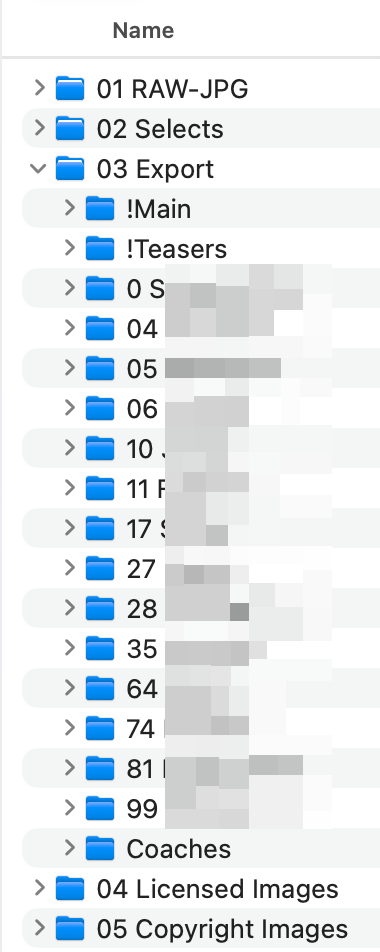
When I export images from Lightroom, they land in that team/weeks !Main folder which is inside of my Exports folder.

Then, on the same folder level as Main, I have the player folders.

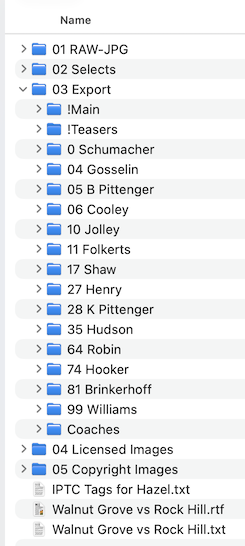
Finder view: Image
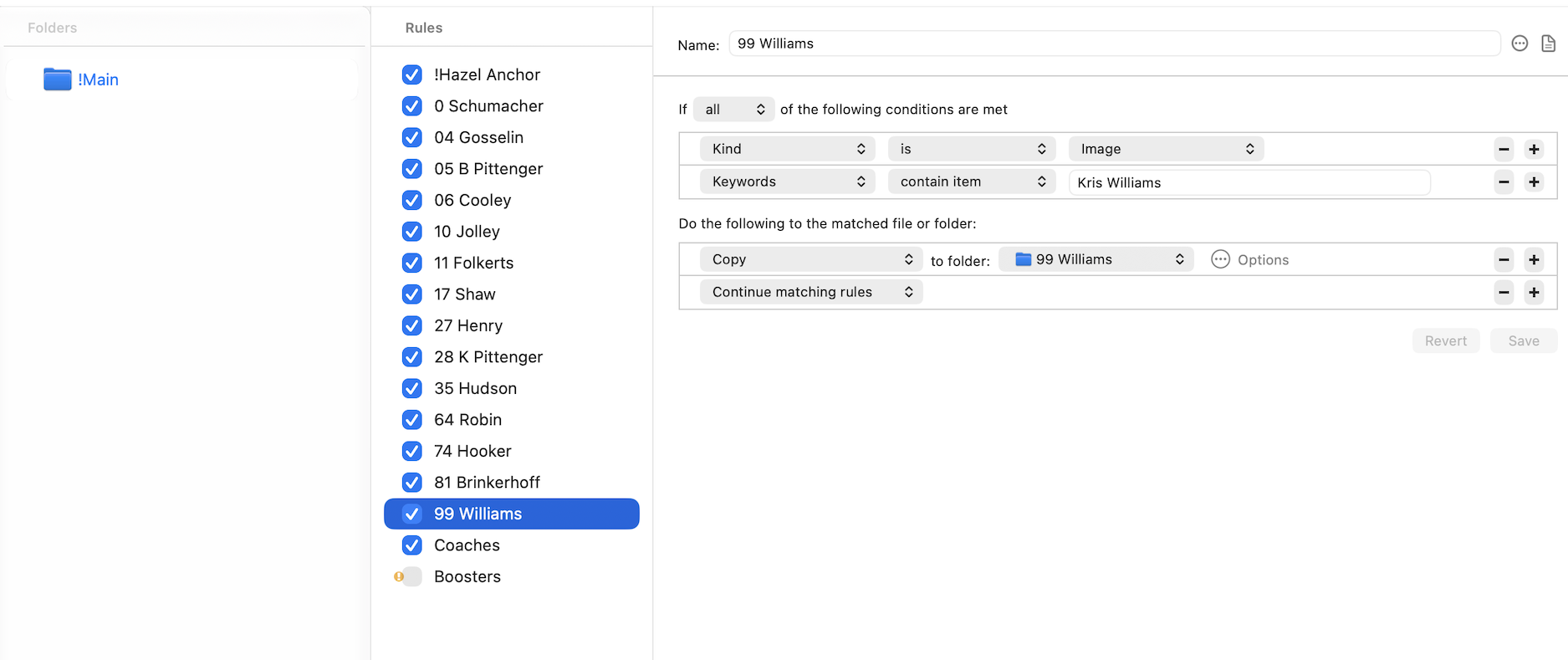
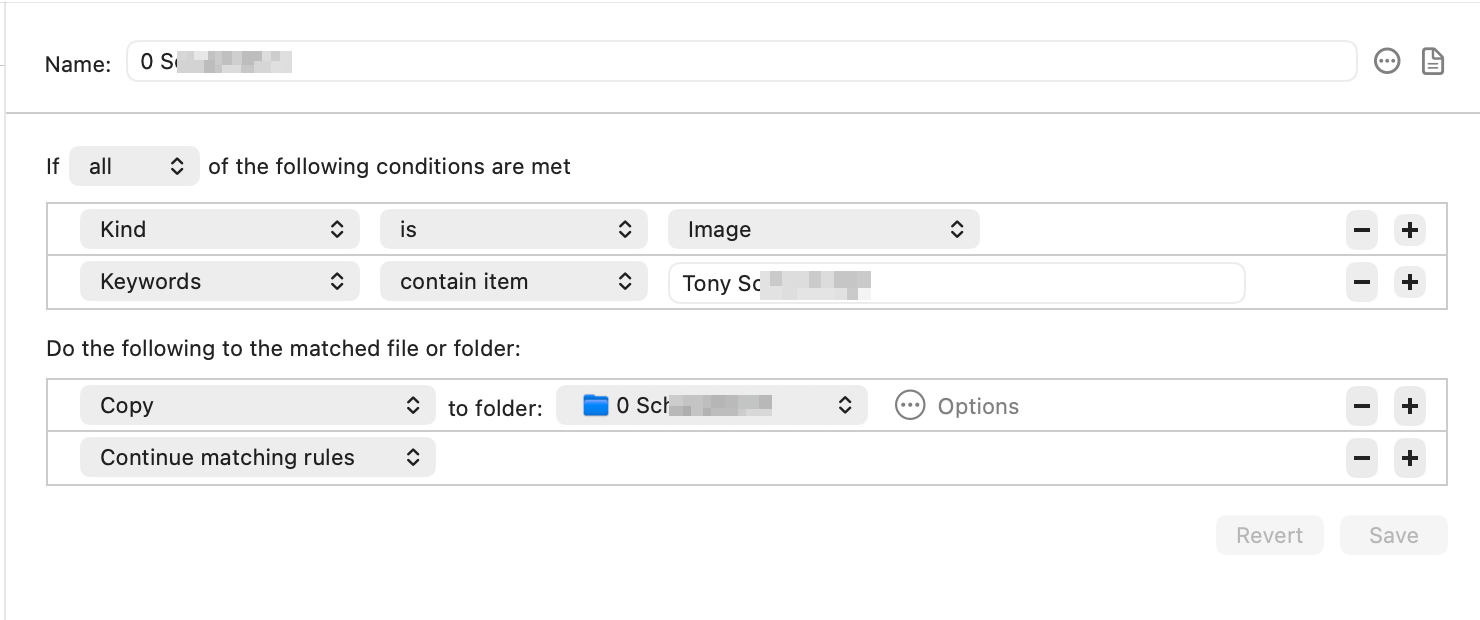
Hazel Rules view: Image

Perfect world, I would change the Main (in the Folders section of Hazel) then the Rules (all the individual players folders) would then inherit the Main's file location... but, presumably, this is not the case.

What am I missing to only have to change one (or maybe 2) folders/links to get this all to work?

In an average week, I have been relinking ~60-80 players and there HAS to be a better way.

Thank you in advance for any specific guidance on this or letting me know how I could/should restructure my folders to make this more efficient.

Thank you again!

--Stephen
Re: Resetting Folders week to week

PostPosted: Tue Sep 22, 2026 10:06 am
by Mr_Noodle
Are you hardcoding folders in your rules? I really can't say much without a ton more detail about what your rules are doing.

Re: Resetting Folders week to week

PostPosted: Sat Sep 26, 2026 4:07 pm
by Monsignor
Mr_Noodle wrote:Are you hardcoding folders in your rules? I really can't say much without a ton more detail about what your rules are doing.


Yes, my rules are hard coded. Is this sufficient, or do you need additional details?
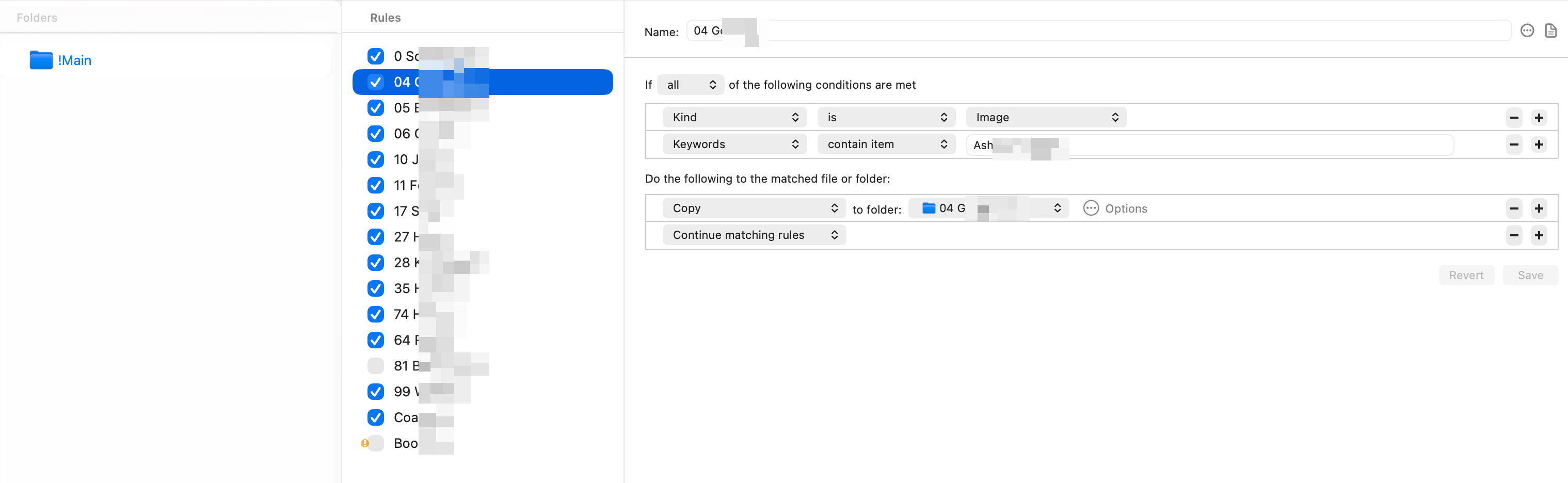
Image

Re: Resetting Folders week to week

PostPosted: Mon Sep 28, 2026 8:42 am
by Mr_Noodle
Yes, please provide more details.

Re: Resetting Folders week to week

PostPosted: Tue Sep 29, 2026 10:10 am
by Monsignor
Mr_Noodle wrote:Yes, please provide more details.


Here's a bit of a cradle-to-grave view:
  • Each week, for this particular team, I create a structured folder system using Post Haste.
  • I ingest all photos with PhotoMechanic, add IPTC, etc.
  • I use PhotoMechanic to quickly cull through my images. All images I want to edit/process are first key-worded with the players' name(s) (via Keyboard Maestro and my Launchpad Mini) then 'Selected'.
  • All selects are then sent to Lightroom (or Capture One) for editing.
  • All images are exported from Lightroom (or Capture One) to a folder called !Main which lives inside of my "03 Export" folder (see pic below).
  • I have Hazel set to monitor the !Main folder in its new location each week (see pic below).
  • I then copy all the player folders from the older event's !MAIN to the new !Main and then manually re-link each player folder to the new event folders.
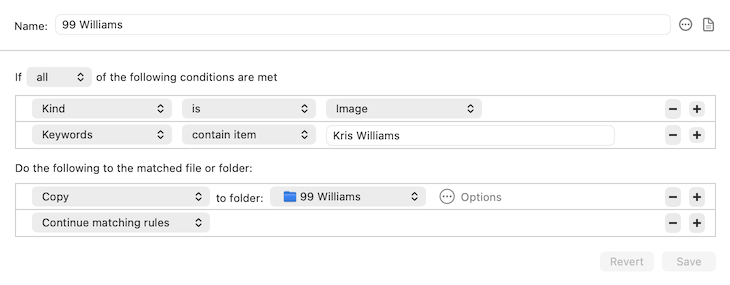
  • My folder rules in Hazel are [I think] fairly straight forward - Hazel searches each image looking for a/the keyword; if found, copies that image to the corresponding player folder; some images may have 1 or 3 or 6 (or whatever) players or groups listed and will copy/distribute accordingly (see pic below).

My overarching question is - if I move the !Main from Event A to new Event B then copy/move all the player folders over to the new !Main, will these automatically inherit the !Main folder location/structure and just 'fall into place'. This does not appear to be the methodology. What I have done is to try and re-associate the player folders to a non-player folder (called !Hazel Anchor) and have the sibling folders then inherit the properties of the !Hazel Anchor, but that hasn't worked too smoothly for me.

I am probably missing a huge piece of this or assuming that things work A way when, in fact, they work ANOTHER way... and, that's all cool but I just need to understand the association(s) and the flow better.

Thank you!

Image

Image

Image

Re: Resetting Folders week to week

PostPosted: Wed Sep 30, 2026 8:35 am
by Mr_Noodle
All these folders are under a common folder, right? In such a case, it makes more sense to use Sort into Subfolder. That is relative to the file's current position. You can precede that with a single rule to move the file (along with Continue) if the file isn't already in the common folder.

By doing that, you only need to change that one Move to point it to a new location.

Also, instead of hardcoding the subfolder names, you can use a pattern. For instance, you can set up a pattern using a custom table attribute, where you can set up a table with the text to look for in one column and the name of the folder in another. That can consolidate a lot of your rules into a single one.

Re: Resetting Folders week to week

PostPosted: Wed Sep 30, 2026 10:04 am
by Monsignor
Mr_Noodle wrote:All these folders are under a common folder, right? In such a case, it makes more sense to use Sort into Subfolder. That is relative to the file's current position. You can precede that with a single rule to move the file (along with Continue) if the file isn't already in the common folder.

By doing that, you only need to change that one Move to point it to a new location.

Also, instead of hardcoding the subfolder names, you can use a pattern. For instance, you can set up a pattern using a custom table attribute, where you can set up a table with the text to look for in one column and the name of the folder in another. That can consolidate a lot of your rules into a single one.


GREAT information - thank you!

And yes, the individual player folders are all inside of 03 Export. !Main and all player folders are on the same folder level.

On the table - that might be a better option especially if I am adding or shifting players around - would make life a bit easier. I will look into using tables. Now, before I get myself twisted-up, the tables would only replace the rules side - the !Main will need to be moved for that team for each event, correct?

Thank you again!

Re: Resetting Folders week to week

PostPosted: Wed Sep 30, 2026 1:22 pm
by Monsignor
Let me add one more variable I don't believe I have mentioned or it was mentioned in passing.

When I am adding keywords (player names) to the images in Photo Mechanic - many photos may contain 1-2-5 or more names (as keywords) per image.. meaning, ONE photo might get copied into 1-2-5 (or more) player folders based on who is in the pic and how they're keyworded.

Not sure if that makes the table recommendation stronger or..?

Thanks again!

Re: Resetting Folders week to week

PostPosted: Thu Oct 01, 2026 9:13 am
by Mr_Noodle
Hmm, depends. If you use a table, it will match the first row it finds. You might need to have a rule check for each (hardcoded) name.

Even without the table, though, using "Sort into subfolder" will make it easier to relocate things as needed.

Re: Resetting Folders week to week

PostPosted: Thu Oct 01, 2026 1:02 pm
by Monsignor
Here's what I CAN say - WHEN I have the monitored folder (!MAIN) and the RULES (players) all pointing to the correct place, it works flawlessly.

The part that is still eluding me is the 'simple' or 'easy' way to have this same bank of rules apply to each new game with minimal tapping/poking.

I did try and see if I could export the rules for this particular team then, when the event folders are built via Post Haste, every week the bank of rules would be baked-in to the Post Haste structure, then I would resurrect the rules from inside that folder structure but, alas, discovered that the rules are (or seem to be) hard-coded to the !Main at the time of backing them up and there's not a way I can see to trigger them to take on that particular folders' attributes.

Not sure if all that made sense?

Re: Resetting Folders week to week

PostPosted: Thu Oct 01, 2026 8:46 pm
by Monsignor
I took a different path and it seems to work quite well with only one click... or maybe 2 clicks..

In each player folder, instead of Copy to folder: [Player Folder], I changed that to Run Shell Script then continue matching rules.

I kept the existing Hazel rules and IPTC keyword matching, but replaced each Copy to Folder action with a small embedded zsh script. The script looks at the location of the JPEG Hazel is currently processing:
Code: Select all
Current Event/03 Export/!Main/photo.jpg


The script goes up one level to determine the current event’s 03 Export, then appends the appropriate player folder:
Code: Select all
Current Event/03 Export/01 Jones


The rules are now portable and event-independent. They don’t know (or care) whether the event is October 2, October 17, or next season...

The weekly workflow changed from:

Add !Main → copy over or import rules → manually relink every player destination

to simply:

Add new !Main → copy over or import scripted rules → process normally.

Hazel Issue:
Hazel may freeze/beachball while editing multiple embedded-script rules. Save frequently and restart Hazel if necessary. This has not affected normal image processing; a 160-image routing test completed successfully. I can provide more details in a bug report or a separate thread. I do not believe this had anything to do with my scripts.

Re: Resetting Folders week to week

PostPosted: Fri Oct 02, 2026 9:34 am
by Mr_Noodle
Glad you figured out a solution. If Hazel beachballs, launch Activity Monitor, select Hazel and do "Sample Process". Email in the output. Thanks.

Re: Resetting Folders week to week

PostPosted: Fri Oct 02, 2026 5:10 pm
by Monsignor
I was adding other players and I got the hang again. How best to get to you?